RentOk Release Note - 19th Dec, 2025
Release note 19th Dec, 2025
Hello! This week's update is packed with improvements to give you more control and visibility. We're introducing activity logs for your staff, making it easier to manage dues in shared rooms, and launching a powerful new search to help you navigate the app faster than ever.
New: Team Member Activity Logs Track all staff actions in one place
For better accountability, you can now view a complete history of all actions taken by a specific team member.
See what’s new →
Highlights
-
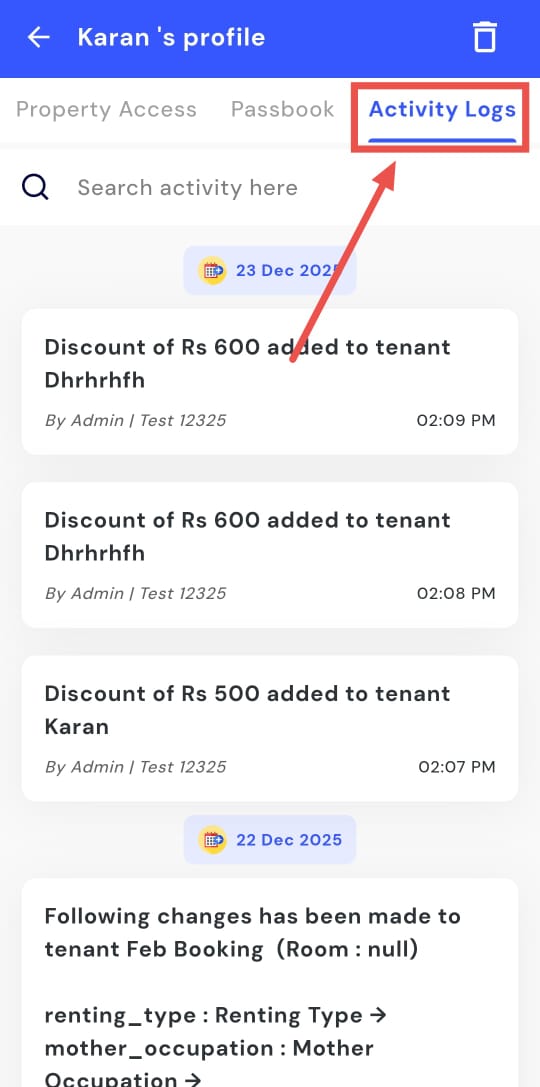
Complete History: See every activity a staff member has performed, like recording a payment, adding a tenant, or resolving a complaint.
-
Date & Time Stamps: Each activity is logged with a precise date and time.
-
Easy to Access: Find the logs under a new "Activity Logs" tab within each team member's profile.
-
Search Functionality: Quickly search within the logs to find a specific action.
How to try
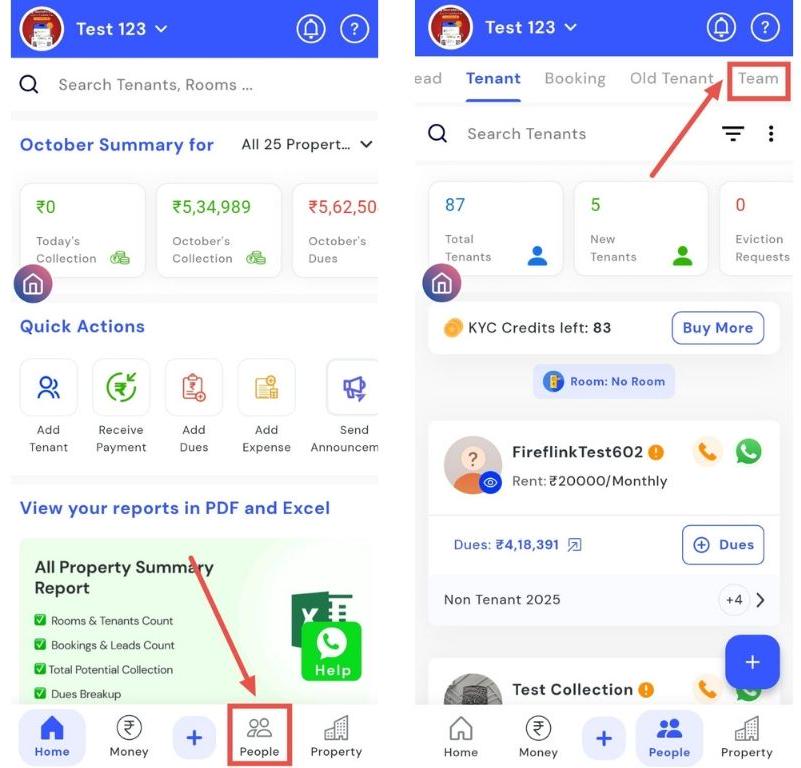
- Step 1: Open the Team section Tap the People icon in the bottom navigation menu, then select Team.
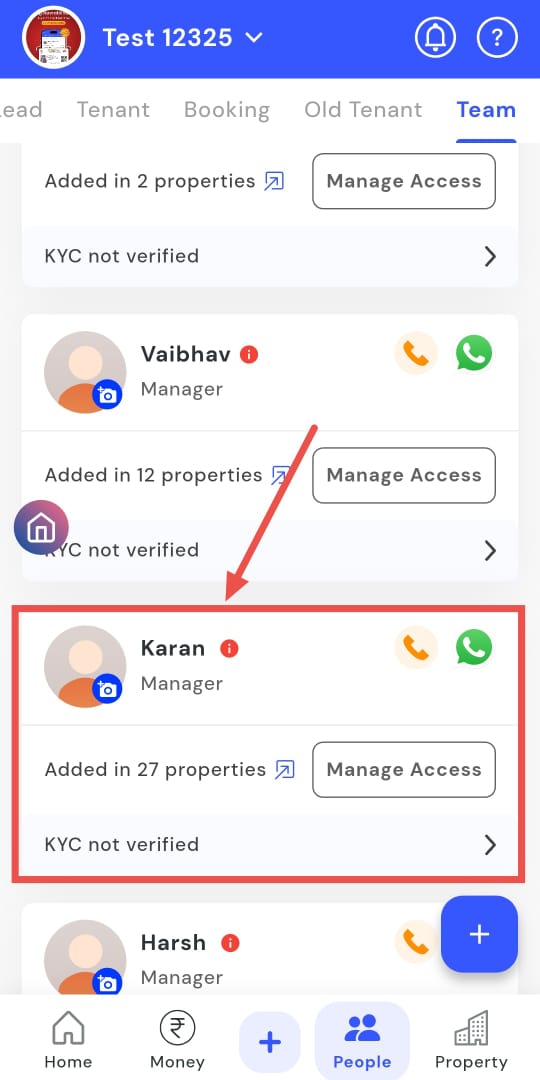
- Step 2: Select a team member Choose the team member whose activity you want to check.
- Step 3: View activity logs Open Activity Logs to see all the actions performed by that specific team member.
| 💡 Why it matters: This provides property owners and admins with a clear and transparent view of staff activity, making it easier to audit actions and improve team accountability. |
|---|
Split Dues in Shared Rooms: Choose how to apply charges
When adding a due to a room with multiple tenants, you now have clear options to either split the amount equally among them or apply the full amount to each tenant.
See what’s new →
Highlights
-
Avoid Confusion: No more guesswork. Explicitly choose how to divide charges like electricity or maintenance bills.
-
Clear Visibility: The app shows you exactly how much each tenant will be charged before you add the due.
-
Two Simple Options: Choose "Split Equally" or "Charge Each" based on your need.
-
Saves Time: Prevents the need to add individual dues for each tenant in a shared room.
How to try
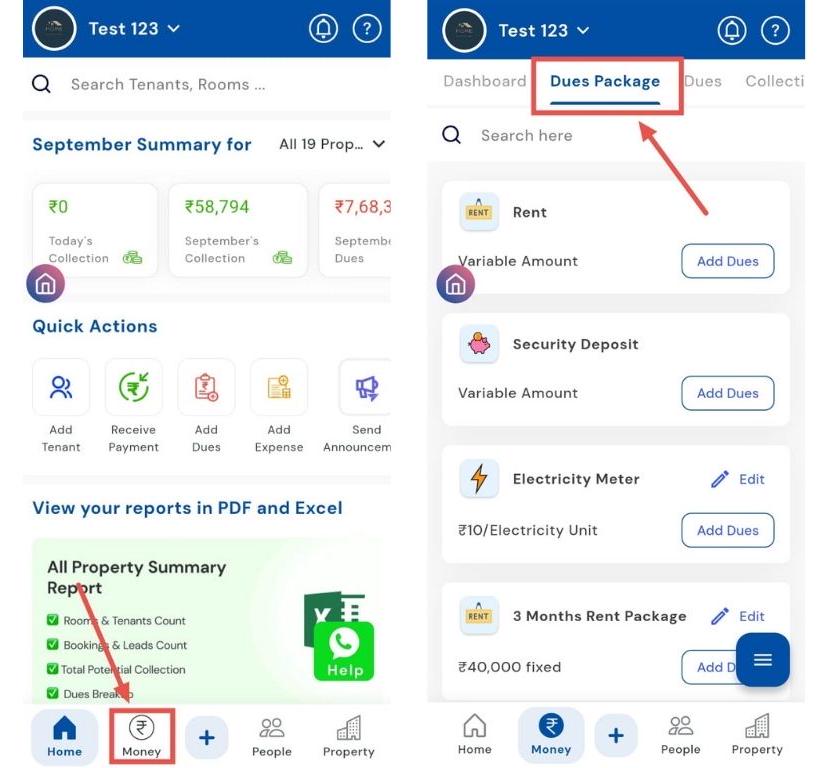
- Step 1: Open Dues Package Section Tap the Money icon in the bottom navigation menu, then select Dues Package to access package settings.
- Step 2: Select the package and add dues Choose the package for which you want to add dues, then click Add Dues. For example, select the laundry package and proceed.
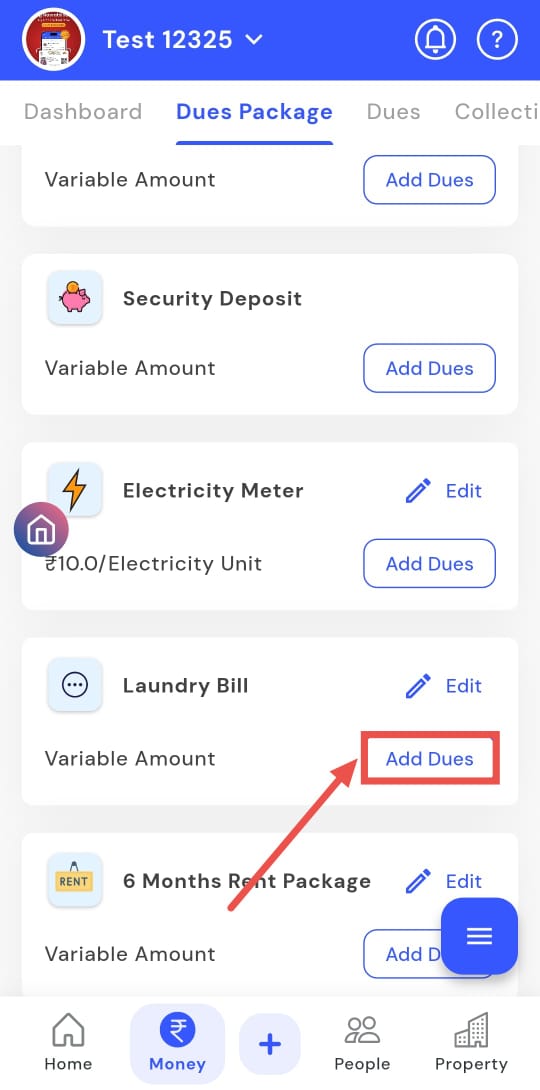
- Step 3: Select a shared room Choose the room with multiple tenants for which you want to add the dues.
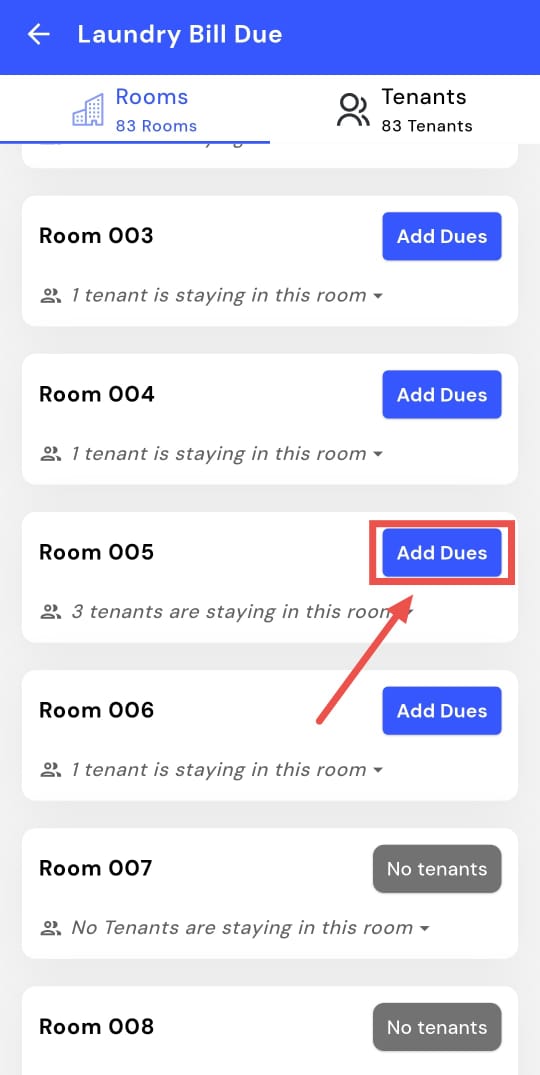
-
Step 4: Add and Split the Dues Enter the dues amount. You can either assign the amount to
-
Each tenant individually
-
Split the total amount equally among all tenants in the room
-
For example, if there are three tenants, you can divide ₹1,000 among them or charge ₹1,000 per person.
- Step 5: Save the Dues Click Add Dues to confirm. The dues will be added successfully.
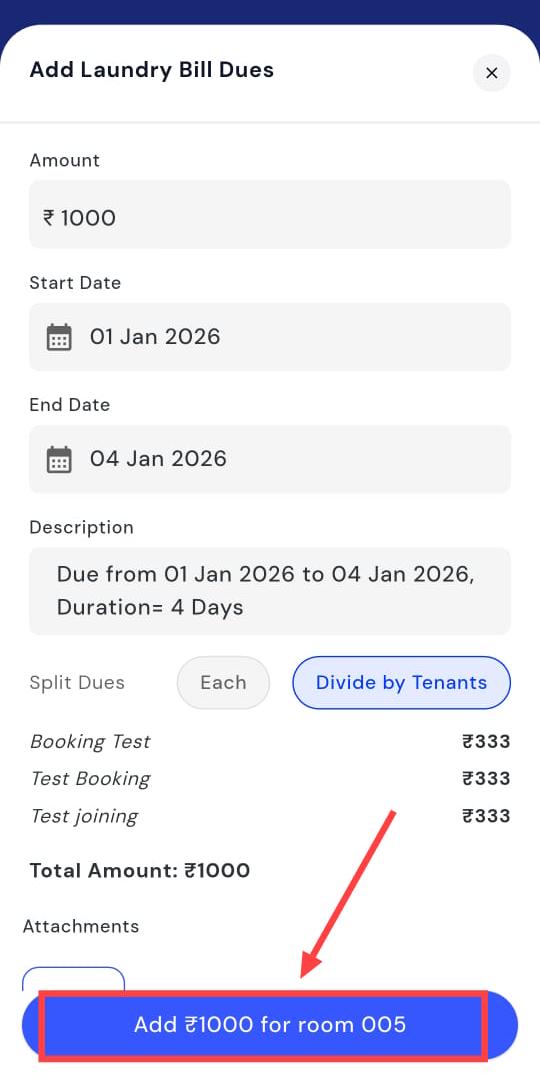
| TIP: This step is only available for rooms with more than one tenant. |
|---|
| 💡 Why it matters: This solves a major confusion point for managers. It ensures accurate billing for shared expenses and reduces the chances of incorrect dues being raised. |
|---|
Ab shared rooms mein bill divide karna hua bilkul aasan.
Global In-App Search Find anything, instantly
We've introduced a powerful new global search bar on the home screen. Use it to find tenants, properties, or jump directly to any setting in the app.
See what’s new →
Highlights
-
Search Everything: Type a tenant's name, property name, or a setting like "Agreement" or "Last Entry Time."
-
Quick Navigation: The search results act as direct links, taking you straight to the relevant page.
-
Switch Properties: If you search for a tenant in another property, the app will ask for permission to switch and take you right to their profile.
-
Saves Clicks: No more navigating through multiple menus to find what you're looking for.
How to try
- Step 1: Open the Manager’s App and Search Open the Manager’s app and tap the Search bar at the top of the screen.
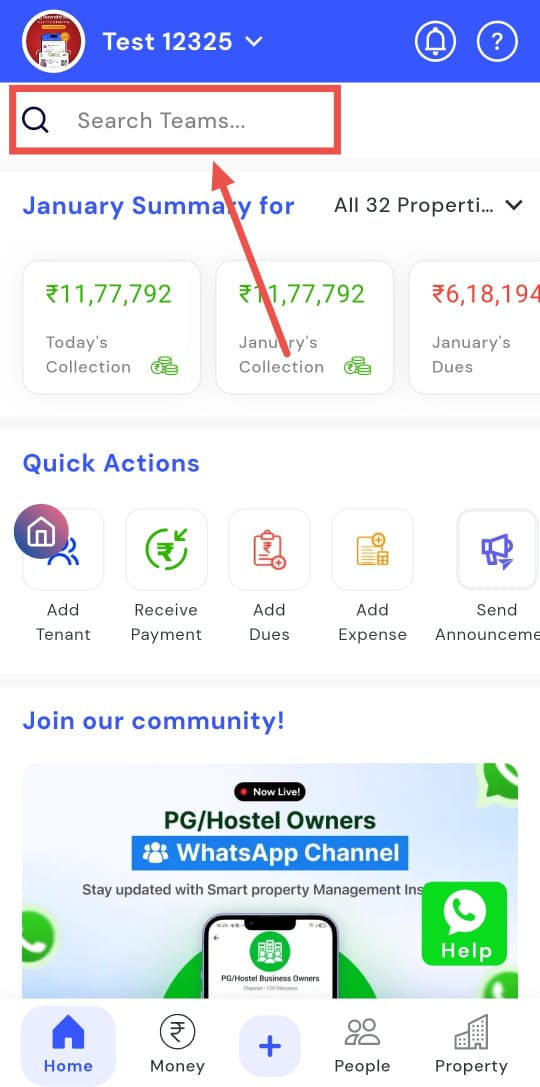
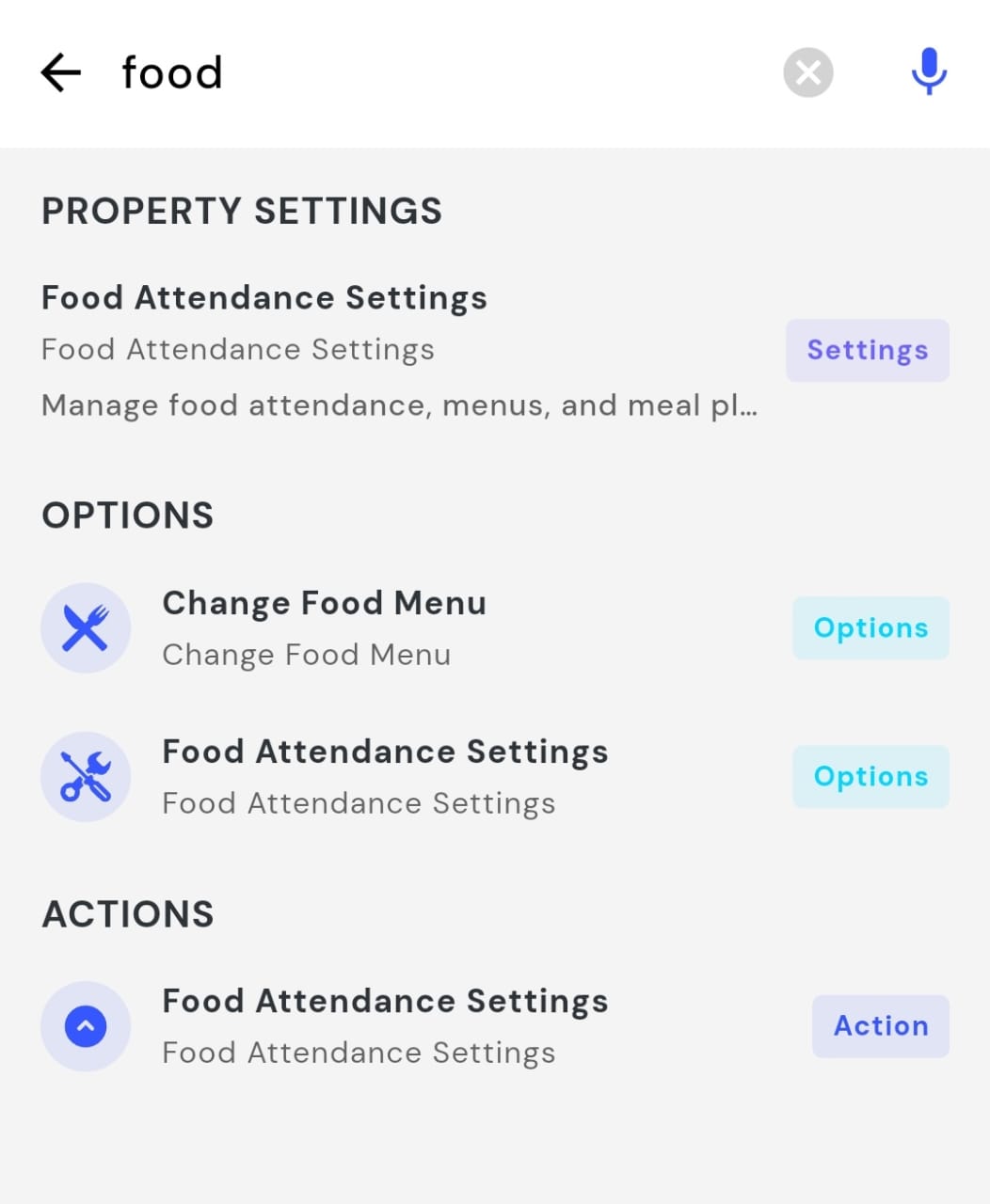
- Step 2: Enter a Keyword and View Results Type the keyword you’re looking for, for example, food. The app will display all available options related to your search.
| 💡 Why it matters: This is a huge time-saver for anyone managing multiple properties or needing to access specific settings quickly. It makes the entire app feel faster and more intuitive. |
|---|
✨ Fixes & Polish
-
Announcements with Video & Voice: You can now attach video files and record voice notes in announcements, making your communication more engaging.
-
Revamped Bank Linking UI: The screen for linking bank accounts to properties has been redesigned for a cleaner and more intuitive experience.
-
Improved Team Permissions: The process for copying access permissions from one staff member to another is now clearer and more reliable.
-
Consolidated Food Settings: The settings for Breakfast, Lunch, and Dinner timings and cut-offs are now neatly organized on a single screen.
-
Attachments in Add Tenant Flow: You can now add attachments (like photos or documents) when adding a new tenant's initial due and collection.
-
Check-in/Check-out Time for All: The check-in and check-out time fields are now visible for long-term tenants, not just short-term ones.
Availability & Rollout
-
Platforms: Manager App (Android & iOS)
-
Rollout: Immediate
-
Who gets it: All properties
-
Need help? Message us on WhatsApp from inside the app.
Thank You
Have doubts or any feedback? Chat with us in-app (Help → send us message). We’re building for you, and every suggestion counts!